← Back to Products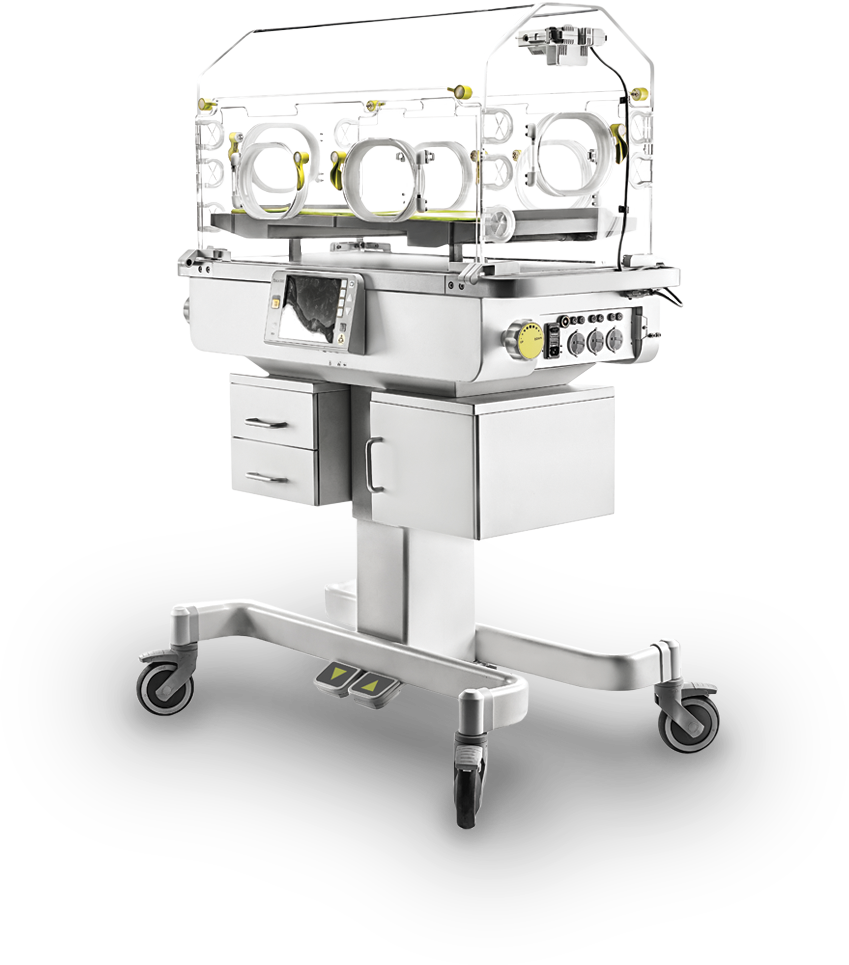
Incubator
Incubator INC-3000
Reliable medical equipment engineered for clinical performance and hospital use.
Product Details
Features
- Soundproof hood provides newborn a super quite environment by reducing the noise level to 45dB.
- User-friendly design provides medical personnel a pleasuresome experience to operate it.
- Big storage drawers
- Ergonomic designed handle with perfect height
- Detachable water reservoir, easy to clean and sterilize
- Three auxiliary power output
- Tente castor with lock
Specifications
Physical Attributes
- Height: 126.1 cm to 146.1 cm
- Width: 99.7 cm
- Depth: 57.7 cm
- Weight: 80 kg
Hood Specifications
- Tubing access ports: 10
- Access door size: 18×13 cm
- Mattress to hood height: 4.8 cm
- Soft bed mattress size:
- Mattress tilt: ±12°
- Drawer depth: 36 cm
- Drawer size: & (×2)
Temperature Control Modes
Air mode
- Temperature range: 20° C - 37° C
- Override temperature range: 37° C - 39° C
- Accuracy: ≤ ±1.0° C
Skin mode
- Temperature range: 34° C - 37° C
- Override temperature range: 37° C - 38° C
- Accuracy: ±0.3° C
- Dual-skin temperature monitoring: Yes
Servo Humidity Option
- Humidity control range: 30%-95%RH
- Humidity control operating time without refilling: 24 hours
- Humidity control reservoir capacity: 1500 ml
- Humidity display accuracy: ±5%RH
- Humidity control accuracy: ±5%RH
Servo Oxygen Option
- Air flow velocity across mattress: <10 cm/sec
- Temperature rise time at 22° C (72° F) ambient: <20 min (From 22° C, 50% RH, to 35° C)
- Temperature variability: <0.2° C
- Temperature overshoot: <0.5° C maximum
- Temperature uniformity with a level matress: <0.8° C
- Operating noise level in hood: ≤45 dBa
- Carbon Dioxide (CO2) Level: <0.5%
Scale Option
- Weight range: 300 g to 8 kg
- Weight display resolution: 1 g
- Weight accuracy: ±10 g
Operating Environment
- Temperature: 20° to 30° C
- Humidity: 10 to 95% RH
- Air Velocity: Up to 0.3 m/sec
Storage/Shipping Information
- Temperature: -25° to 60° C
- Humidity: 0 to 95% RH
Alarm List
A. System Fault Alarm
- Stuck Key: This alarm occurs when a stuck key is detected.
- Sensor Disconnect: This alarm occurs when communication with the sensor module fails.
- Sensor Module Failure3: This alarm occurs when the controller detects a sensor module fan is not rotating.
- Sensor Module Failure6: This alarm occurs when the controller detects the ambient temperature sensor is open or shorted.
- Sensor Module Failure8: This alarm occurs when the controller detects that the sensor module watchdog reset.
- Low air flow: This alarm occurs when an air circulation failure is detected.
- Air Flow Probe Failed: This alarm occurs if the air flow probe connection is open or short circuited.
- Motor Failed: This alarm is activated when the fan motor speed falls outside specified tolerances.
- Power Failure: This alarm occurs when the AC power supply is off. (within 30s)
- Battery Disconnect: This Alarm occurs when battery is disconnected.
- Sensor Out of Position: This alarm occurs when the sensor module is not in the hood.
- Access Panel Open: This alarm occurs when access panel is open.
- Heater Failed: This alarm occurs when the heater is over temperature.
- Heater Failed2: This alarm occurs when the heater is damaged.
- Air Probe Failed: This alarm occurs when one of the two thermistors in the sensor module differ from the other by 0.8°C or both two thermistors have a measurement error exceeding acceptable limits.
- Skin1 Probe Fail Alarm: This alarm occurs in the Skin mode if the Skin1 probe is electrically open or shorted.
- Watchdog Failed: This alarm occurs when a failure is detected with the watchdog.
B. Temperature Alarm
- High Skin Temperature: This alarm occurs when the indicated displayed temperature differs from the set temperature by <0.5°C or <1,0°C (user selectable, default 1.0°C).
- Low Skin Temperature: This alarm occurs when the indicated displayed temperature differs from the set temperature by < 0.5°C or >1.0°C (user selectable, default 1.0°C).
- Remove Skin2 Probe: This alarm occurs when two skin probes are installed and the Skin mode is selected.
- Skin Probe Disconnect: This alarm is activated when the Skin1 temperature probe (only in the Skin mode) is removed from the sensor module. The associated monitoring display is blanked. (within 30s)
- High Temp CutOut: Under air control, this alarm is activated if the displayed incubator temperature reaches 38°C for set temperatures >37°C, or 40°C for set temperatures <37°C. Under skin control, this alarm is activated if the incubator temperature reaches 40°C for any set temperature.
- High Air Temperature: This alarm occurs when the indicated displayed temperature differs from the set temperature by <1.5° C.
- Low Air Temperature: This alarm occurs when the indicated displayed temperature differs from the set temperature by >2.5°C.
- High Skin1 Temperature: This alarm occurs when the Air mode is enabled and the infant skin temperature (from the Skin1 probe) is <38.0°C when the Override mode is not active, or <39.0°C when the <37°C made of operation is active.
- High Skin2 Temperature: This alarm occurs when the Air mode is enabled and the infant skin temperature (from the Skin2 probe) is <38.0°C when the Override mode is not active, or <39.0°C when the <37°C made of operation is active.
C. Humidity Alarm
- Humidity Heater Failed1: This alarm occurs when the humidity heater temperature is over heat.
- Add Water: No enough water in water reservoir.
- Low Humidity: This alarm occurs when the humidity is 10% lower than setting humidity. Note: The alarm is blocked for 30 minutes everytime turn on the machine, or 15 minutes everytime the humidity setting value is changed.
- Reservoir Out of Position: This alarm occurs when the water reservoir not in position.
- Humidity Heater Failed2: This alarm occurs when the heater thermocouple wires are open or shorted.
D. Oxygen Alarm
- Oxygen Cell: This alarm occurs when the oxygen cell readings differ by more than 3%. As a result, the oxygen flow into the system is interrupted.
- Difference: This alarm occurs when the displayed oxygen value is <3% below the oxygen set point.
- Low Oxygen: Low Oxygen value is <3% above the oxygen set point
- High Oxygen: This alarm occurs when the displayed oxygen cells are out of date.
- Change Oxygen Cells: This Alarm occurs when the 02 source pressure is low or high.
- Check 02 Supply: This alarm occurs when proportional value is failed.
- Servo 02 System Fail: This Alarm occurs when the oxygen cell is disconnected with module box.